
pretty much this
Background
I discovered through a previous pentest two vulnerable behaviours which stemmed from developer footguns, which I’ll share in depth below.
One related to ViteJS was notoriously hard to reproduce, which led me down a path to reading countless GitHub issues and online articles. This led to a subsequent observation for ViteJS which I have included for brevity.
The two ViteJS behaviours are not novel discoveries by me, instead I have documented my testing setup and attempts at reproducing the impactful behaviour below.
1. Capacitor Logging
What is Capacitor?
The Capacitor framework by Ionic lets one convert an eligible web application into a version that can run on both mobile and desktop environments.
The framework provides logging interfaces for developers to use when catching errors or other information, which becomes interesting once you factor in the conversion process since:
- logging for a web application goes to backend server logs
- logging for a mobile application goes to the app’s logs on the user device
The Footgun
The logging configuration can be set via the capacitor.config.(ts|js|json) files:
const config: CapacitorConfig = {
	appId: 'com.foo.bar',
	appName: 'Foobar App',
	loggingBehavior: 'production',
	server: {
		androidScheme: 'https',
    },
The Capacitor v3 documentation below provides developers with three main options for logging:
  //*
   * The build configuration (as defined by the native app) under which Capacitor
   * will send statements to the log system. This applies to log statements in
   * native code as well as statements redirected from JavaScript   (`console.debug`,
   * `console.error`, etc.). Enabling logging will let statements render in the
   * Xcode and Android Studio windows but can leak information on device if   enabled
   * in released builds.
   *
   * 'none' = logs are never produced
   * 'debug' = logs are produced in debug builds but not production builds
   * 'production' = logs are always produced
   *
   * @since 3.0.0
   * @default debug
   */
  loggingBehavior?: 'none' | 'debug' | 'production';
As a developer, it would be easy to assume that debug would produce logs while production did not. Unfortunately this is not the case.
In my test, this misalignment in assumed and actual behaviour caused a user’s plaintext username, password, and session cookies to be logged whenever they performed a sign-in to the mobile app. 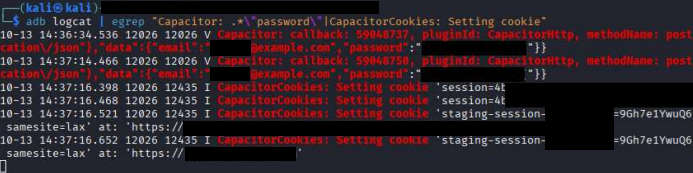
Perhaps full would be a better-fitting option in order to avoid misinterpretation of logging behaviour.
Public Discourse
I haven’t actually seen anyone talk about this yet, understandably so because the logging itself isn’t immediately bad, it’s just risky - with added impact based on what gets logged.
Reproduction Steps
No need since its pretty straightforward.
How bad is it?
Compared to the other two below, the scope of impact for this one is reduced since the blast zone is restricted to local device.
Currently, a sample GitHub search reveals ~156 public repos using this configuration:
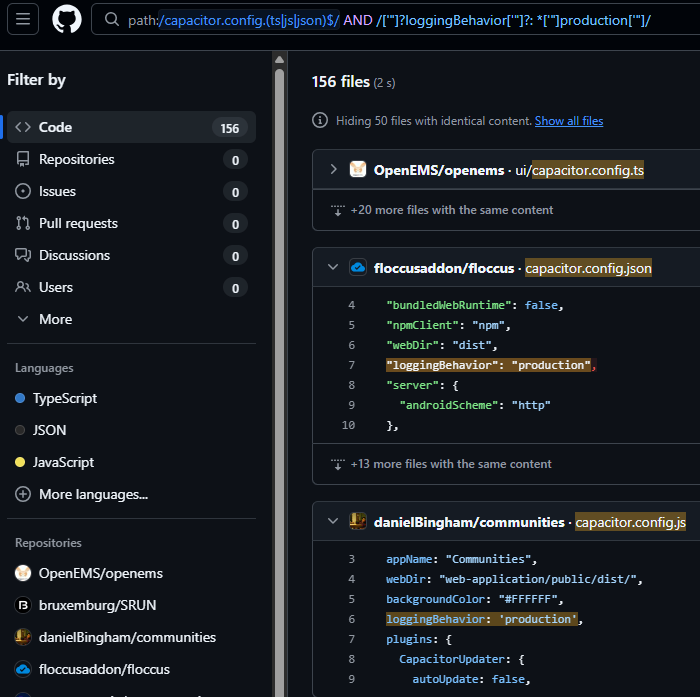
In comparison, this search shows 140 repos using the more secure configurations.
2. Vite.JS process.env
What is Vite?
Vite is a modern successor to Webpack, known for its speed. In the same tool, you can:
- run a development server that serves frontend content and handles backend processes
- run a build process for frontend assets to bundle them for production use.
If you can see where this is going, this tool handles both frontend and backend stuff, which raises the possibility of intermingling between the two.
The Footgun(s)
Under specific circumstances explored further below, backend environment variables could get baked into frontend JavaScript bundles.
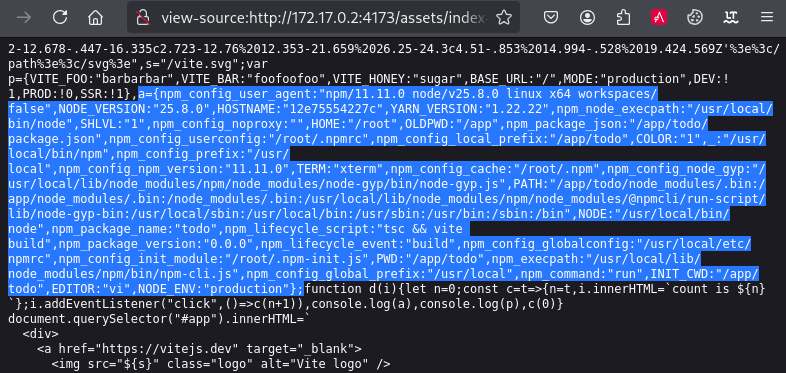
This would expose sensitive internal information such as application secrets, build secrets, and additional credentials/access tokens to any application users with access to the frontend JS bundle.
Public Discourse
- 18/07/2024 - https://github.com/vitejs/vite/issues/17710 (semi-related)
- 19/03/2025 - https://github.com/vitejs/vite/pull/19517 (warning message added to v4.5.10)
- 09/02/2026 - https://github.com/vitejs/vite/pull/21623/changes (semi-related)
Reproduction Steps
- Setup a throwaway node environment
- make a new directory ie.
mkdir ~/vite-test && cd ~/vite-test - Download and run a Node docker container with current directory mounted
docker run -it --rm -v "$(pwd):/app" -w /app node:latest /bin/bash
- make a new directory ie.
- Setup a Vite project in the directory (in container)
npm create vite@5.2.0 -- -template vanilla-ts- Give the directory random name of your choice, I went with
todo - I used the Typescript template for my testing but Javascript should work fine too
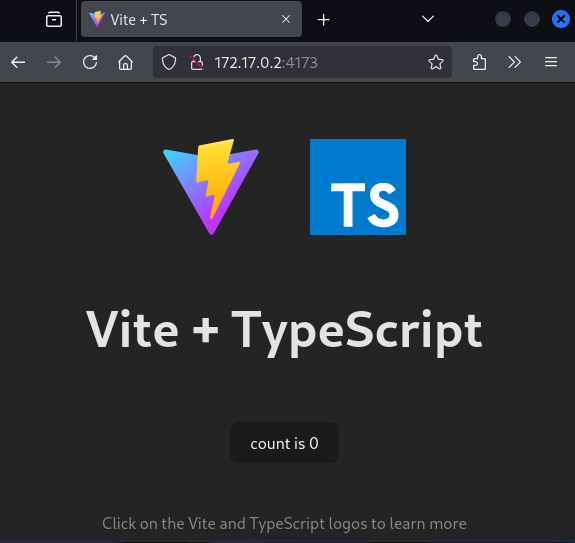
The template sets up a simple app with a counter that you can click on
- Add
vite.config.tsfile inside the newly templated directory (on host)- Open a new shell and
cd ~/vitest/todo && touch vite.config.ts:import { defineConfig, loadEnv } from 'vite'; export default defineConfig(({ mode }) => { return { define: { "process.env": process.env } }; });
- Open a new shell and
- Add a small
.envfile with dummy data: (on host)VITE_FOO=barbarbar VITE_BAR=foofoofoo SECRET_KEY=iloveyou123 VITE_HONEY=sugar API_TOKEN=apiapiapi
You may need to adjust folder read/write permissions accordingly due to the directories installed by Docker process via mounting
- Shell #2 into the Node docker container
- Find the container’s name under
docker container ls docker exec --it <CONTAINER_NAME> /bin/bash
- Find the container’s name under
- Install packages (in container)
cd /app/todo- Modify
package.jsonto your target version of Vite, I used5.1.8 sed -i 's/"vite": "[^"]*"/"vite": "5.1.8"/' package.jsonnpm install
- Build the bundle (in container)
npm run build -- -l info -w(Build with logging enabled and watch for changes)
- Preview the bundle (in container)
cd /app/todonpm run preview -- --host -d
- Watch for changes in the bundle (on host)
- Open a new shell and
cd ~/vite-test/todo watch -n 1 "cat dist/assets/*.js | tr ';' \"\\n\" | grep VITE ; echo && ls dist/assets/*.js"
- Open a new shell and
- Open
counter.ts(on host)- Open a new shell and open
counter.tsfor editing
- Open a new shell and open
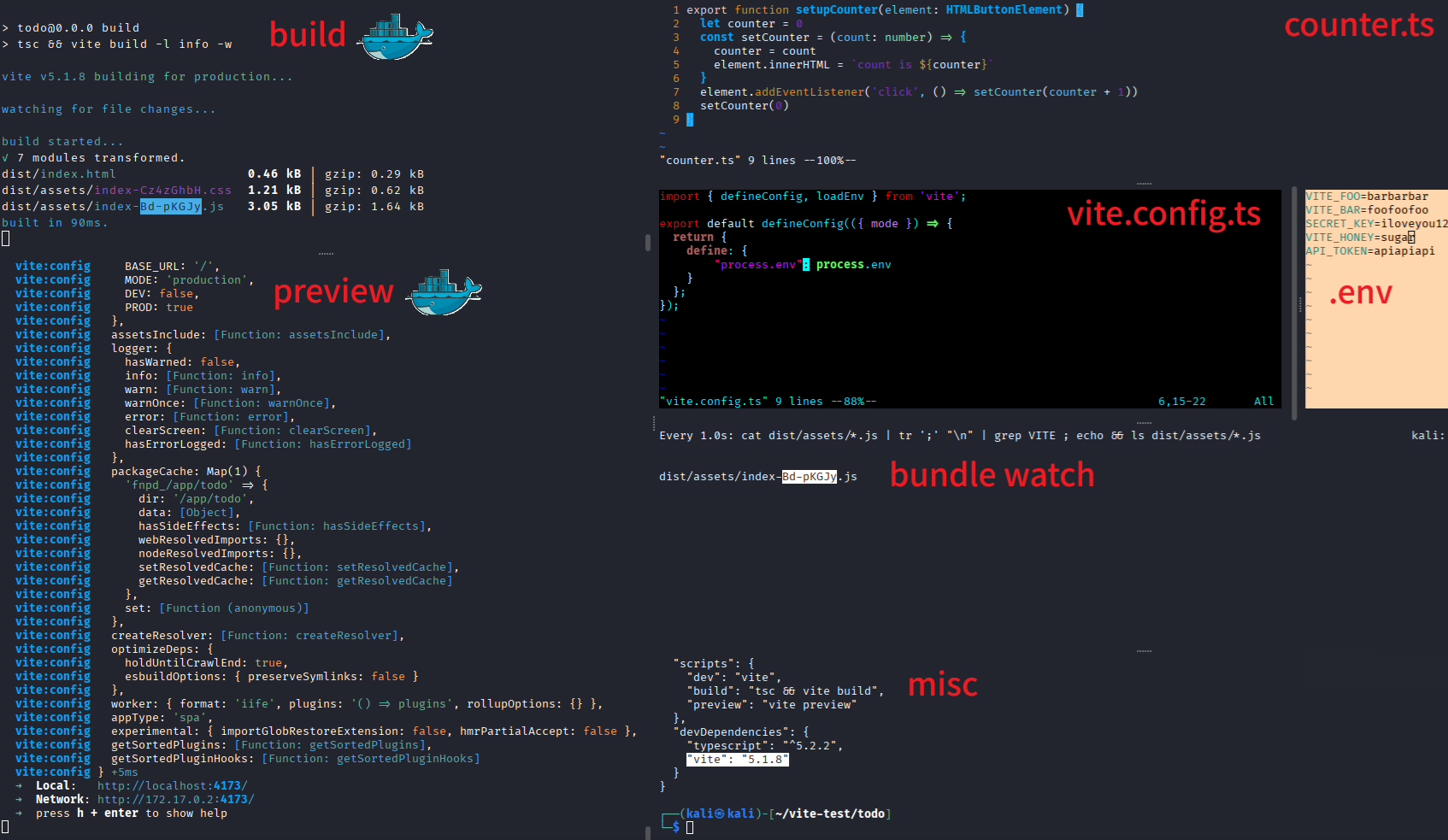
If all goes well the setup should look like so:
- Add
console.log(import.meta.env)tocounter.tsexport function setupCounter(element: HTMLButtonElement) { let counter = 0 const setCounter = (count: number) => { counter = count element.innerHTML = `count is ${counter}` } element.addEventListener('click', () => setCounter(counter + 1)) console.log(import.meta.env) // <------ setCounter(0) } - Observe rebuild of bundle on file save
build started... ✓ 1 modules transformed. dist/index.html 0.46 kB │ gzip: 0.29 kB dist/assets/index-Cz4zGhbH.css 1.21 kB │ gzip: 0.62 kB dist/assets/index-Bd-pKGJy.js 3.05 kB │ gzip: 1.64 kB built in 32ms. - Observe
VITE_*and default environment variables pop up in the watch windowEvery 1.0s: cat dist/assets/*.js | tr ';' "\n" | grep VITE ; echo && ls dist/assets/*.js kali: Sat Mar 18 10:02:22 2026 var a={VITE_FOO:"barbarbar",VITE_BAR:"foofoofoo",VITE_HONEY:"sugar",BASE_URL:"/",MODE:"production",DEV:!1,PROD:!0,SSR:!1} dist/assets/index-Bd-pKGJy.js - Move
console.log(import.meta.env)to a new function withincounter.tsexport function setupCounter(element: HTMLButtonElement) { let counter = 0 const setCounter = (count: number) => { counter = count element.innerHTML = `count is ${counter}` } element.addEventListener('click', () => setCounter(counter + 1)) setCounter(0) } function foo() { // <----- console.log(import.meta.env) // <----- } // <----- - Observe rebuild of bundle on file save
- Observe
VITE_*and default environment variables gone from the watch window
This happens because the
foofunction is notexportedand is therefore not expected to be used in the frontend. ThesetupCounterfunction is imported on line 4 ofmain.ts, which in turn is called byindex.html. Thus, any function that is interacted with on the frontend will be bundled.
The Missing Piece ( A Hypothesis)
I was stuck for awhile wondering how despite
process.envbeing included into Vite; it wasn’t automatically making its way into the frontend. Since abusingimport.meta.envdid not work, I went back to playing around withprocess.env.
- Observe
process.envin vite preview window: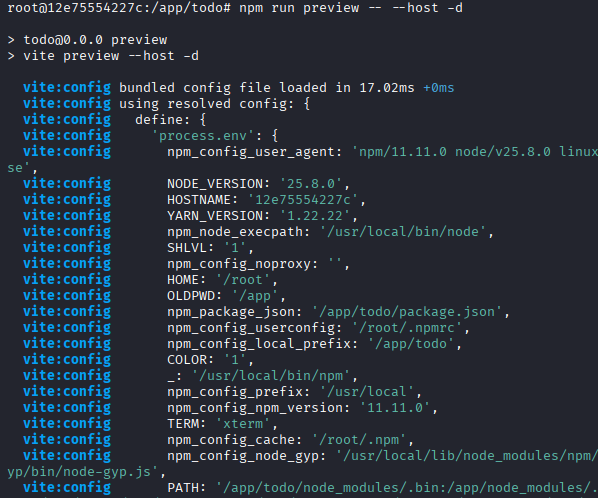
- Add
console.log(process.env)tocounter.tsexport function setupCounter(element: HTMLButtonElement) { let counter = 0 const setCounter = (count: number) => { counter = count element.innerHTML = `count is ${counter}` } element.addEventListener('click', () => setCounter(counter + 1)) console.log(import.meta.env) console.log(process.env) // <----- setCounter(0) } - Observe rebuild of bundle on file change
- Observe backend environment variables pop up in the watch window
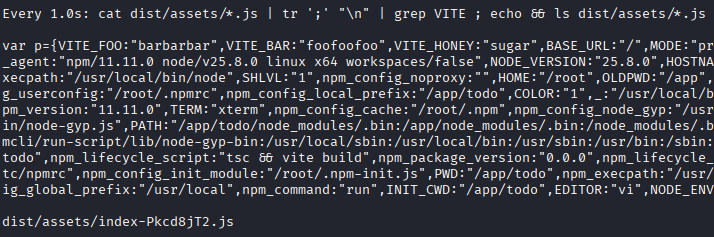
Note that if you exit the build watch and try to do fresh build of the bundle, it will fail with:
src/counter.ts:8:15 - error TS2580: Cannot find name 'process'.
Do you need to install type definitions for node?
Try `npm i --save-dev @types/node`.
8 console.log(process.env)However, for whatever reason - the build process works if you :
- build first with no errors
- have watch enabled for the build
- add in
console.log(process.env)+console.log(import.meta.env)- save and trigger a re-build via watch
This was the only way I’ve seen so far to reproduce after much trial and error. There might be other ways too but will be left as an exercise for the reader.
Does this method work on latest Vite?
- Navigate back to container pwd (in container)
- cd
/app
- cd
- Install new Vite project using newest template (in container)
- (Newest Vite Template at time of writing is 9.0.3)
npm create vite@9.0.3 -- -template vanilla-ts
- Observe Vite version
Vite v8.0.1
- Continue with remaining steps as usual
- Observe warning message on build
- Observe outcome in JS bundle
The answer is yes for up to v8.0.1
How bad is it?
Currently, a sample GitHub search reveals ~5.2k public repos using this configuration:
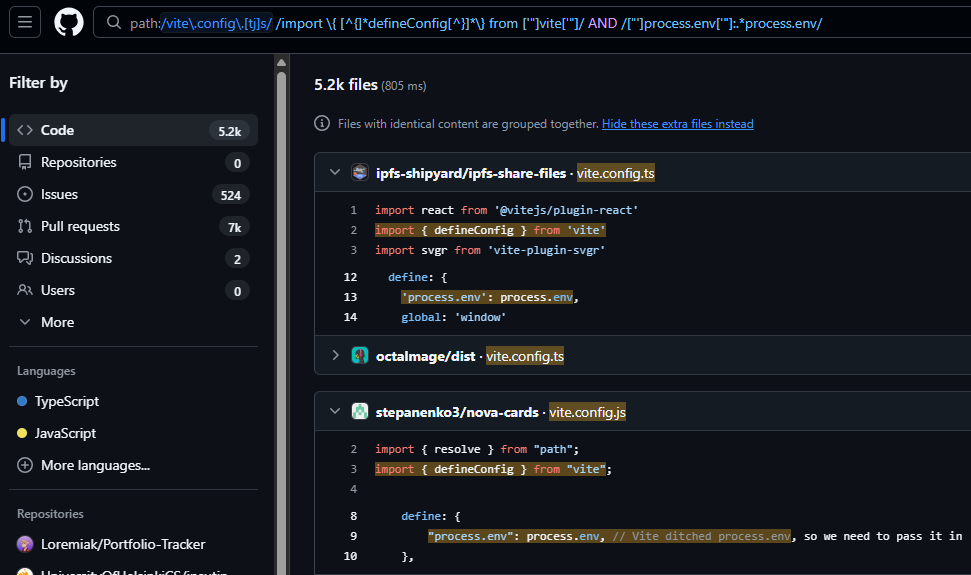
However, this doesn’t account for whether the repos include
console.log(process.env). I grabbed a sample size of 120+ repos from GitHub search and grepped for any such instances but found none.
Newer versions of Vite will also warn you when the unsafe config is present, as per pull request above. 
3. ViteJS loadEnv
What is loadEnv?
This is a function that allows developers to load in environment variables based on different environment files such as .env, .env.production, .env.staging, etc. It is great for having the stack run properly no matter which environment it is dropped into.
According to official docs:
Load .env files within the envDir. By default, only env variables prefixed with
VITE_are loaded, unless prefixes is changed.
Function definition:
function loadEnv(
  mode: string,
  envDir: string,
  prefixes: string | string[] = 'VITE_',
): Record<string, string>
As documented above, Vite tries to keep developers safe by only including environment variables prefixed with VITE_ by default. This makes it a more explicit action that can’t be misunderstood.
However, developers apparently still needed to inject runtime environment variables which depending on how much the environment changes, may not already have the VITE_ prefix. Leaving the prefix empty is the “easiest” way to solve this problem, but it is not the only way.
In newer versions of Vite, Vite will refuse to build if you specify an empty prefix via the envPrefix(docs) option, since an empty prefix would match all environment variables. 
However, no such error is given when an empty prefix is passed to loadEnv’s third parameter.
The Footgun
The risk and impact here very similar to the
process.envobservation above.
As discovered through several cases below, developers that -
- copied code samples from the official documentation
- blindly used LLM-generated content
- accepted the risk for the easiest solution
were likely to end up having the code below:
import { defineConfig, loadEnv } from 'vite';

export default defineConfig(({ mode }) => {
  const env = loadEnv(mode, process.cwd(), '')

  return {
    define: {
        "process.env": env
    }
  };
});
This is different than the official code sample:
import { defineConfig, loadEnv } from 'vite'

export default defineConfig(({ mode }) => {
  // Load env file based on `mode` in the current working directory.
  // Set the third parameter to '' to load all env regardless of the
  // `VITE_` prefix.
  const env = loadEnv(mode, process.cwd(), '')
  return {
    define: {
      // Provide an explicit app-level constant derived from an env var.
      __APP_ENV__: JSON.stringify(env.APP_ENV),
    },
    // Example: use an env var to set the dev server port conditionally.
    server: {
      port: env.APP_PORT ? Number(env.APP_PORT) : 5173,
    },
  }
})
Although environment variables are loaded into the env variable, it is never directly passed to process.env; Conversely, the first code sample directly passes env to process.env, which introduces unnecessary risk.
Public Discourse
- 15/05/2024 - https://github.com/vitejs/vite/issues/16686
- 24/10/2024 - https://github.com/vitejs/vite/pull/18441
- 25/02/2025 - https://github.com/vitejs/vite/pull/19510
- 25/08/2025 - https://github.com/vitejs/vite/pull/20624/changes (addressed vague documentation)
Reproduction steps
The steps for testing and reproduction are basically the same as for above, but just swapping out the code for loadEnv in vite.config.ts re. the code sample above. The same console.log(process.env) steps also apply here.
How bad is it?
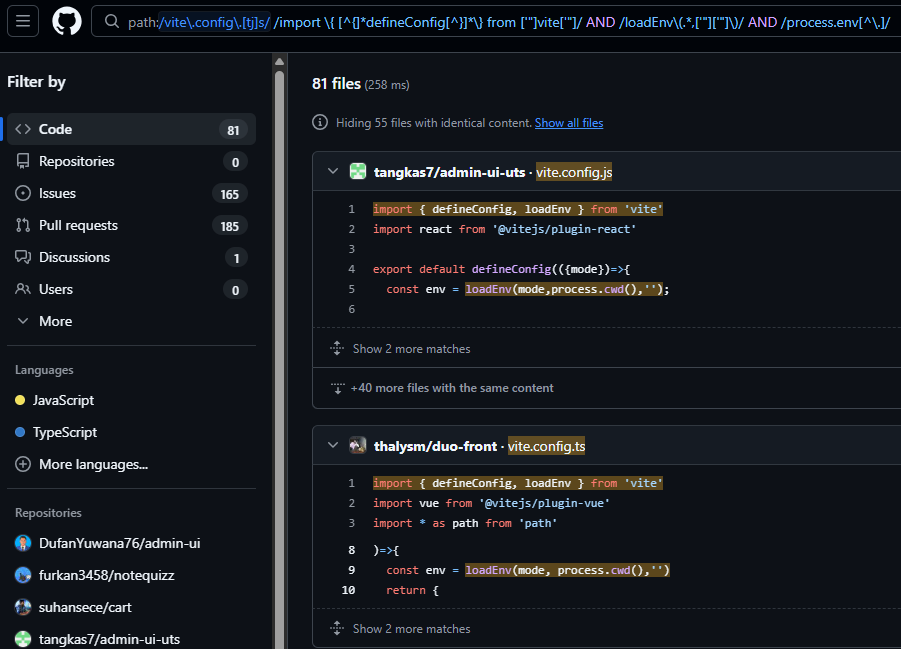
Currently, a sample GitHub search reveals ~81 public repos using this configuration:
Conclusion
It’s not much but I hope this blog can help bring more awareness to the unexpected and sometimes dangerous side-effects of footguns. It seems that modern web technology is continuing to trend toward the direction of blurring the lines between the frontend and backend, so these types of footguns may continue to surface in the coming future.
I have written up custom semgrep rules which you can use to check if your local repositories are affected.